Blog

Inside Reforge Robotics

Stories, sources of inspiration, and more from our engineers and founders.

$35 Calibration vs. $50k Laser Tracker

By Iago Alves Pereira

The economics of robot calibration are changing. Here's what that means.

For most of the history of industrial robotics, there's been exactly one way to make a robot more accurate: hire a metrology specialist, rent or buy a laser tracker, shut down the cell, and spend hours — sometimes days — running a calibration procedure that most teams can't do in-house.

Laser trackers work. They measure position with sub-micrometer precision, and for applications that need that level of accuracy — aerospace machining, precision medical device assembly, high-value metrology — the investment makes sense. The parts are worth enough to justify $50,000 to $150,000 in equipment, plus the engineering time to operate it.

But here's what we've learned from talking to dozens of robotics teams: most of them don't need sub-micrometer accuracy. They need their robot to actually go where the controller says it should go. And for that problem, the laser tracker has always been overkill — not because the technology is wrong, but because the cost structure makes it inaccessible to the teams that need calibration the most.

The teams that live with the error

The robotics teams we talk to — cobot OEMs, system integrators, precision manufacturing operations — are building systems where accuracy matters but the unit economics don't support traditional metrology.

A startup building a cobot for lab automation can't justify a $50,000 laser tracker for every unit they ship. An integrator deploying welding cells for a contract manufacturer isn't going to bring in a metrology specialist every time they commission a new robot. A warehouse automation company running hundreds of arms across multiple sites can't shut down production for a full-day calibration on each machine.

So they live with the error. They run slower to hold tolerance. They spend days on touch-up programming to teach each robot where things actually are versus where the kinematic model says they should be. They accept that programs aren't portable between nominally identical cells because each robot has a slightly different error signature.

These aren't teams that don't care about accuracy. They're teams that can't afford the cure.

What changed

The fundamental insight behind our approach to kinematic calibration is that you don't need external metrology equipment to identify a robot's real geometric parameters. You need the robot's own sensors and a known reference.

Our calibration process uses a commodity hardware fixture — a precision calibration target that can be built from off-the-shelf components for under $35 and assembled in under five minutes. The robot touches or approaches the target in a structured sequence of configurations, and from the joint encoder data at each configuration, we identify the actual kinematic parameters of the machine. Link lengths, joint axis orientations, offsets, frame alignments — the real values, not the nominal ones from the manufacturer's datasheet.

The calibration takes approximately 10 minutes. No laser tracker. No metrology specialist. No production shutdown beyond the time it takes to run the routine.

The results

We've validated this approach across multiple robot platforms. The measured improvement: positional accuracy improves from roughly 0.6 to 1.0mm down to 0.18 to 0.21mm. That's a 3x to 5x improvement in absolute accuracy.

To put that in context: a robot with 1mm of positional error needs touch-up programming for almost any precision task. A robot with 0.2mm of positional error can run from offline-generated paths. That's the difference between a cell that takes a week to commission and one that takes a day. Between a program that needs to be re-taught on every robot and one that deploys to the fleet.

The accuracy we achieve isn't laser-tracker-grade. We're not claiming sub-0.1mm performance. For applications that genuinely need that — and some do — traditional metrology is still the right tool. But for the vast majority of robotic applications, getting from 1mm to 0.2mm is the step change that matters. It's the threshold where calibration goes from "nice to have" to "the robot actually works."

The cost comparison

The math is straightforward.

Traditional calibration:

  • Laser tracker: $50,000 to $150,000 (purchase or rental)
  • Metrology specialist: typically contracted, hourly or daily rate
  • Production downtime: hours to a full day per robot
  • Recalibration frequency: rarely repeated because of cost, even when accuracy drifts

Software-based calibration:

  • Calibration fixture: under $35 in commodity parts, assembles in under 5 minutes
  • Specialist required: none — the calibration routine runs through the SDK
  • Production downtime: approximately 10 minutes
  • Recalibration frequency: can be repeated after every collision, tool change, maintenance window, or on a regular schedule

The per-robot cost drops by orders of magnitude. But the more important shift is what becomes economically viable when calibration is cheap.

What changes when calibration is affordable

When calibration costs $50,000, you calibrate once and hope the robot doesn't drift. When it costs 10 minutes of downtime, the whole relationship between accuracy and operations changes.

Routine recalibration. Robots drift. Gearbox backlash increases. Bearings develop play. Thermal changes shift the geometry. A collision throws everything off. With affordable calibration, you can recalibrate on a schedule — weekly, monthly, after every maintenance window — the same way you'd change oil in a car. Not because the robot has catastrophically failed, but because maintaining accuracy is now cheaper than living with drift.

Per-unit calibration at scale. If you're an OEM shipping hundreds of robots, per-unit calibration at the end of the manufacturing line becomes a realistic quality step. Every robot ships with a calibrated kinematic model that reflects its actual geometry, not the nominal geometry from the CAD model. The customer receives a robot that goes where it's told from day one.

Fleet-wide accuracy. For operations running multiple robots — across a facility, across sites — affordable calibration means programs become portable. Calibrate each robot to the same standard, and the program that works on one machine works on all of them. The per-robot variation that currently forces per-robot commissioning gets resolved at the calibration step, not the programming step.

Recovery after incidents. Collisions happen. Currently, a collision that changes the robot's geometry means calling in a specialist or living with degraded accuracy until the next scheduled maintenance. With a 10-minute recalibration, you recover immediately. The robot is back to spec before the next shift.

The laser tracker isn't going away

We're not arguing that laser trackers are obsolete. For applications that need sub-0.1mm accuracy — and they exist — precision metrology equipment remains the right tool. For calibrating large-scale structures, multi-robot cells with tight relative positioning requirements, or applications where traceability to metrology standards is a contractual requirement, laser trackers earn their cost.

What we are arguing is that the vast majority of robots running in production today don't need laser-tracker-grade calibration. They need to close the gap between where the controller thinks they are and where they actually are. And for that problem, the economics have fundamentally changed.

The question is no longer "can we afford to calibrate?" It's whether you can afford not to — when the alternative is 10 minutes and $35.

Reforge Robotics builds motion control software that makes robot calibration fast, affordable, and repeatable.
Why We Use Physics, Not AI, to Improve Robot Performance

By Nosa Edoimioya

Our model is deterministic, not probabilistic. That's a deliberate choice.

One of the first questions we get in technical conversations is: "Is this a machine learning model?"

It's a reasonable assumption. In 2026, if someone tells you their software improves robot performance using a calibrated model, the default mental model is a neural network trained on data. The entire industry has been conditioned to assume that "model" means "learned from data in a way that's hard to explain."

Our model is not that. It's a physics-based, deterministic simulation of the robot. And the distinction matters more than you might think.

What the model actually is

When we calibrate a robot, we're building a mathematical replica of how that specific machine responds to commanded inputs. Not a statistical approximation. Not a learned mapping from inputs to outputs. A physics model.

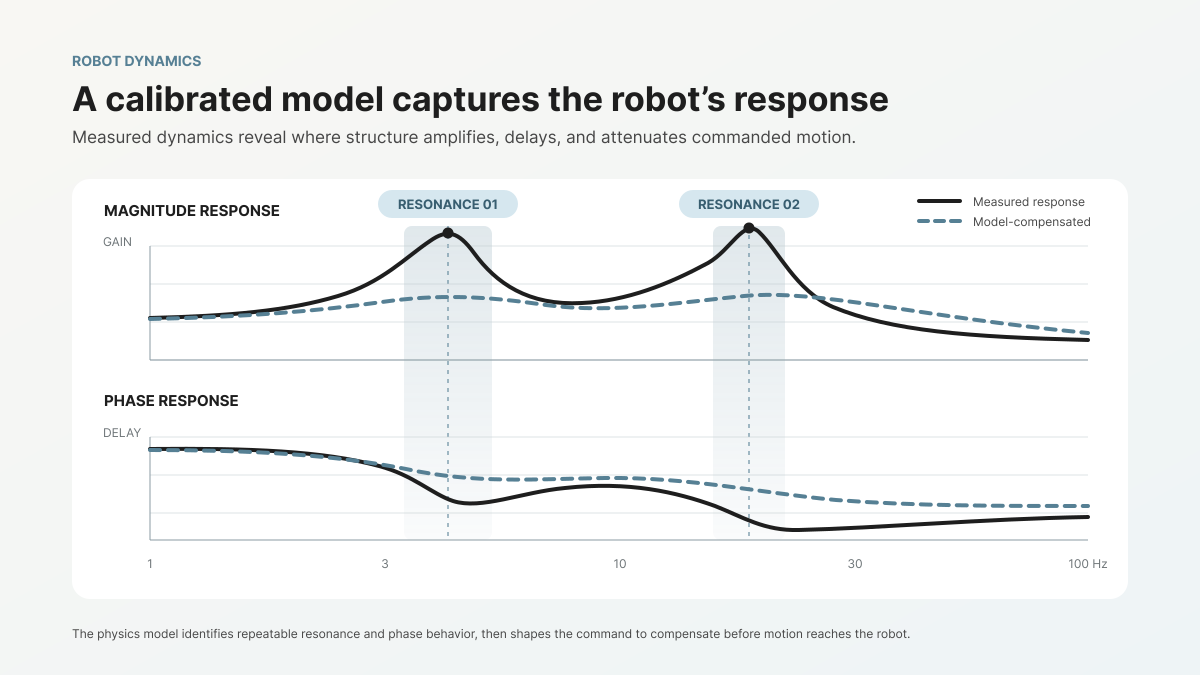
A frequency response plot from a real calibration. The peaks show where the robot's structure amplifies motion — exactly what the physics model captures and compensates for.

The model captures the robot's frequency response characteristics — how the physical system amplifies, attenuates, and delays motion commands across the frequency spectrum. Every robot arm is a mechanical system with mass, stiffness, damping, friction, and compliance at every joint and link. Those physical properties determine how the structure responds when you command a motion. Our calibration process measures those responses and builds a model that reproduces them.

Given a tool path, the model predicts exactly how the robot will behave — where it will overshoot, where it will vibrate, where it will lag. Then we use optimization to modify the input command so that the robot's actual behavior matches the intended path. The controller doesn't learn a general mapping from experience. It predicts the specific physical response and compensates for it.

The output is deterministic. Same input, same model, same output. Every time.

Why not machine learning

We considered it. In the early days, we explored learned models. The appeal is obvious — let the data speak, don't impose assumptions about the physics, let a neural network figure out the relationship between commanded trajectories and actual behavior.

Here's what we found.

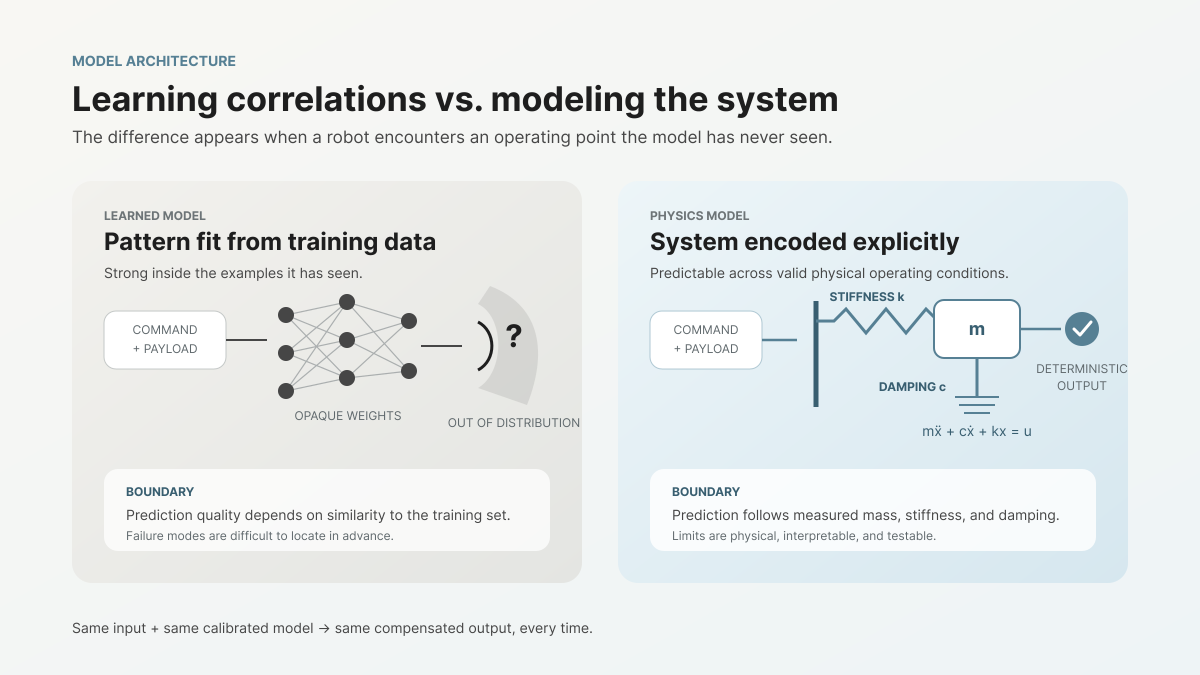
ML models learn correlations from training data. Physics models encode the system that generates the data.

Learned models are robust to what they've seen. A neural network trained on a set of trajectories performs well on similar trajectories. Move outside the training distribution — a new speed profile, a new payload, a different region of the workspace — and the predictions degrade in ways that are difficult to predict in advance. You don't know the boundary of what the model knows until you cross it.

Physics models generalize by construction. If the model correctly captures the mass, stiffness, and damping of the system, it predicts behavior for any trajectory, any speed, any payload within the system's physical limits. The model doesn't need to have seen a specific motion before. It understands the system that produces the motion.

Determinism is not optional for control. When you're modifying the commands that a robot's actuators receive, you need to know exactly what the controller will do. Not approximately. Not with a confidence interval. Exactly.

A probabilistic model has an inherent uncertainty band. For planning, for analysis, for decision support, that uncertainty band is manageable. For real-time control — where the output of the model directly determines the forces applied to a mechanical system — uncertainty means risk. A controller that occasionally produces unexpected outputs is a controller that occasionally moves the robot in ways you didn't intend.

We can't ship that. Our customers operate in environments where unexpected robot behavior has real consequences.

Explainability matters for adoption. When an engineer evaluates our software, they want to understand what it does. Not conceptually — specifically. What does the model capture? Why did it produce this output? If the result is wrong, where is the error?

A physics model answers those questions directly. The model has parameters — masses, stiffnesses, damping ratios, friction coefficients — that correspond to physical properties of the real machine. If the model's prediction doesn't match reality, you can identify which parameter is wrong and why. The debugging process follows the same engineering reasoning that roboticists already use.

A learned model doesn't offer that. The weights of a neural network don't correspond to physical quantities. When a learned model fails, the diagnostic is "retrain with more data" or "the input was outside the training distribution." That's not a diagnosis. It's a restart.

What we gain from physics

The physics-based approach has constraints. It requires a structured calibration process. It requires that we know enough about the physical system to write down the relevant equations. It doesn't handle phenomena we haven't modeled.

But it gives us three things that matter enormously in production:

Predictable behavior at boundaries. Our customers push robots to the edges of their performance envelopes — higher speeds, heavier payloads, longer duty cycles. Physics models degrade gracefully at boundaries because the equations remain valid even as the system approaches its limits. The predictions become less accurate as unmolded effects grow, but they don't suddenly produce nonsensical outputs. They fail in ways that make physical sense.

Per-robot specificity without per-robot training data sets. Every robot we calibrate gets a model tuned to its specific physical parameters. But the calibration process is structured and efficient — typically 5 to 10 minutes for kinematic calibration, 5 to 10 minutes for the feed-forward controller. We don't need hours of trajectory data covering the robot's full workspace. We need a targeted measurement of the system's physical properties.

Transferability across robots of the same SKU. This is a question we get frequently: if you calibrate one robot, does it work on identical robots? With a physics model, the answer is nuanced but useful. Robots of the same SKU share the same basic structure, so a model calibrated on one unit captures roughly 90% of the performance on siblings. The last 10% is per-unit variation — manufacturing tolerances, installation differences, wear. Per-robot calibration closes that gap, but even without it, the physics model provides a strong starting point because it's modeling the right system.

A learned model doesn't transfer as cleanly, because the learned weights encode not just the physics but also the specific noise and artifacts of the training data. A model trained on unit A doesn't generalize to unit B the way a physics model parameterized from unit A does.

The AI distinction that matters

We use the word "model" deliberately. In our context, it means a mathematical representation of a physical system — the same way an aerospace engineer builds a flight dynamics model or a structural engineer builds a finite element model. It predicts behavior from first principles and physical measurements.

We don't have anything against machine learning. We use data-driven techniques in parts of our pipeline where they're appropriate — certain aspects of system identification benefit from optimization methods that could loosely be called "learning." But the core model that drives the controller is physics. It's deterministic. It's explainable. And it produces the same output every time you give it the same input.

When a customer asks "is this AI?", the honest answer is no. And we think that's a better answer for what we're trying to do.

The robots we're improving operate in production environments where predictability, repeatability, and explainability aren't nice-to-have features. They're requirements. A physics model meets those requirements by construction. That's why we chose this path, and it's why we're staying on it.

Same input, same model, same output. Every time.

Reforge Robotics builds open-source motion control software that helps robots move faster, track more accurately, and behave more predictably.

The Backlash Problem in Robotic Machining and What Software Can Do About It

By Nosa Edoimioya

Gear backlash is one of the largest sources of dimensional error in robotic milling. Here’s what it does to your parts and how software-based compensation addresses it.

Robotic milling is gaining ground as an alternative to 5-axis CNC for large, complex, and low-volume parts. A KUKA KR 500, Fanuc M-900, or ABB IRB 6700 costs a fraction of a comparable gantry mill, offers a larger work envelope, and can be repurposed across part families. But accuracy remains the constraint that keeps many machining operations from making the switch.

One of the biggest contributors to that accuracy gap is backlash — and it shows up exactly where milling demands the most from the robot: at direction changes.

What is backlash?

Backlash is the small amount of free movement between mating mechanical components — particularly gears — when the direction of motion reverses. Every gear-driven joint in a robot arm has some backlash. It’s a function of manufacturing tolerances, gear geometry, wear, and assembly.

The mechanism is straightforward. When a motor drives a joint in one direction, the gear teeth are in contact on one side. When the motor reverses, it must cross the backlash gap — the clearance between teeth — before the gear teeth engage on the opposite side and the joint begins moving again. During that crossing, the motor moves but the joint does not. The encoder reads a position change that hasn’t happened at the link.

For a typical industrial robot, backlash per joint ranges from 0.05° to 0.3°. That sounds small, but it compounds. A 0.1° backlash error at a single joint propagates through the kinematic chain. At the end of a 2-meter arm, it becomes 3 mm or more of TCP positioning error.

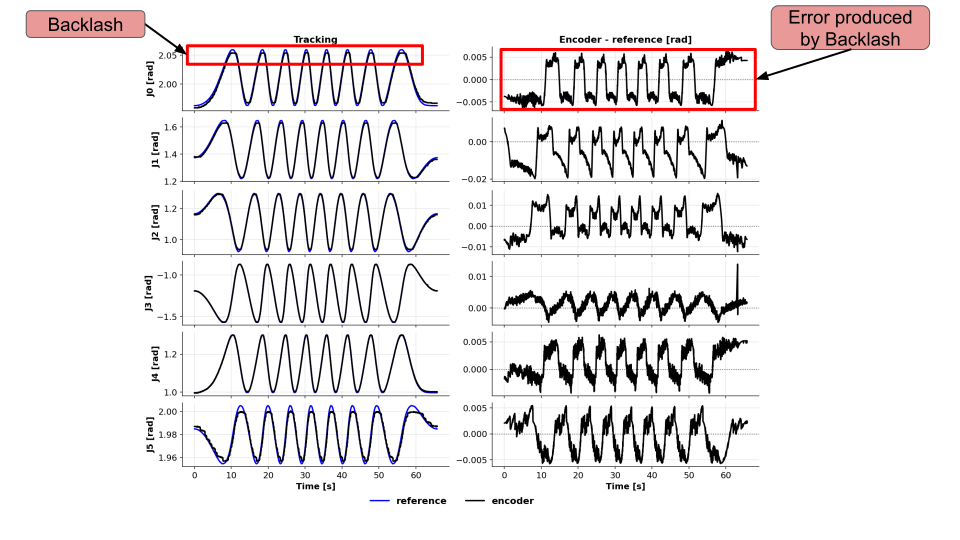
Joint encoder readings and tracking error during repeated direction reversals

Encoder readings and tracking error during repeated reversals in the Reforge validation test.

Why milling exposes backlash more than other applications

Pick-and-place, welding, and palletizing applications often mask backlash because the robot moves in long, sweeping arcs with few reversals. The joints move predominantly in one direction for each segment of the path.

Milling is different. A robot following a contour — profiling a turbine blade root, machining an aircraft skin panel, or cutting a composite layup — reverses joint directions constantly. Every concave-to-convex transition, every pocket corner, every change in contour curvature forces one or more joints through a reversal. Each reversal triggers the backlash gap.

The result is visible on the part:

  • Witness marks at direction changes — small steps or ridges where the tool path shifts by the backlash error as joints reverse
  • Dimensional errors on contoured surfaces — the TCP tracks inside or outside the programmed path depending on the direction of approach
  • Surface finish degradation at corners and transitions — the tool dwells or skips as joints cross their backlash gaps, producing chatter marks or uneven material removal
  • Non-repeatable errors — because backlash depends on the direction of the last motion, the same programmed path can produce different results depending on how the robot arrived at each point

These errors are distinct from the robot’s static accuracy specification. A robot with ±0.05 mm repeatability can still produce 1-3 mm of path error during contour milling if backlash is uncompensated.

How shops deal with backlash today

The current approaches all involve working around the problem rather than solving it:

Approach

What it does

Trade-off

Reduce feed rate

Slows the robot to minimize dynamic effects

Cycle time increases 2-5x; backlash gap still exists, just crossed more slowly

Harmonic drives

Reduces the physical clearance between gear teeth

Higher cost per joint; Add compliance on the robot which limits payload

CAM path compensation

Creates a tool path that avoids joint reversals instead of compensating for the backlash

Do not work for the for tool paths where backlash can not be avoided

Finishing passes with manual correction

Operator measures and corrects after the robot pass

Defeats the purpose of automation; adds labor cost per part

Buy a more expensive robot

Higher-end platforms with tighter mechanical tolerances

KUKA or Fanuc precision series costs 2-4x more; still has backlash, just less of it

None of these approaches address the root cause: the controller doesn’t know the backlash exists and can’t compensate for it in real time.

How software-based backlash compensation works

Software-based compensation operates between the trajectory planner and the robot’s native servo controller. It tracks the direction of motion at each joint and applies a correction when a reversal is detected.

The process has two parts:

Calibration. The system drives each joint through a structured sequence of reversals and measures the actual deadband — the angular gap where the motor moves but the link does not. This is done once per robot and captures the specific backlash characteristics of that arm, including any asymmetry between joints and any configuration-dependent variation.

Real-time compensation. During operation, the software monitors the commanded trajectory for direction reversals at each joint. When a reversal is detected, it injects a correction equal to the identified deadband, so the motor crosses the backlash gap before the joint is expected to begin moving in the new direction. The joint starts its new motion already in contact — eliminating the lag.

This layer works alongside existing accuracy improvements. Kinematic calibration corrects the robot’s geometric model. Dynamic joint tracking compensates for compliance and lag. Backlash compensation handles the direction-reversal error that neither of those can address. Together, they reduce the total path error to a level that starts approaching what many milling operations require.

Measured results

We validated backlash compensation on a trajectory specifically designed to force repeated joint reversals — the kind of multi-axis coordinated motion that robotic milling demands. The robot was commanded to track a circle with the flange center while holding the TCP fixed in Cartesian space, requiring all six joints to reverse direction continuously.

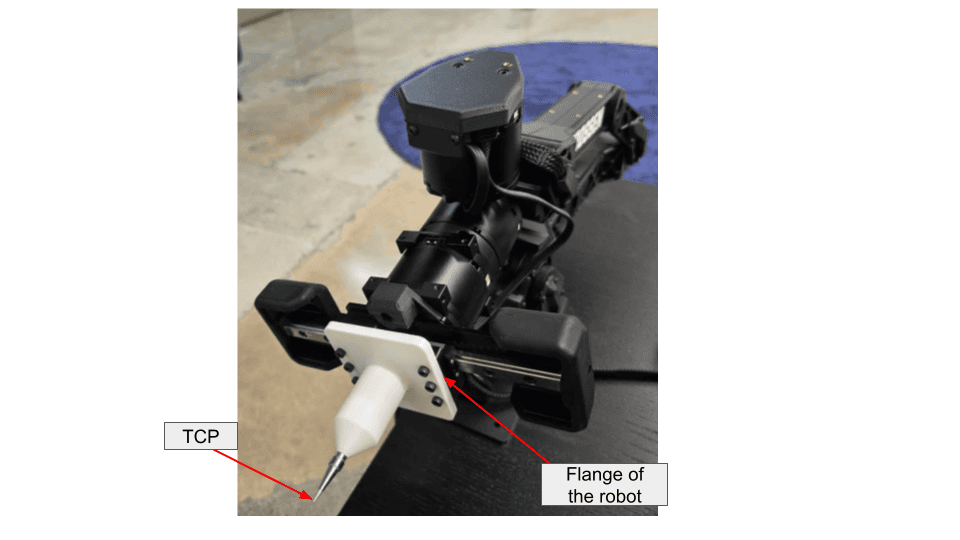
The validation setup: the metal tip marks the TCP, and the labeled flange follows the commanded circle.

Validation test setup with the metal-tip TCP and robot flange labeled

Metric

Without compensation

With compensation

Improvement

3-D TCP RMS tracking error

4.131 mm

0.878 mm

4.70×

All-joint RMS tracking error

0.593°

0.088°

6.75×

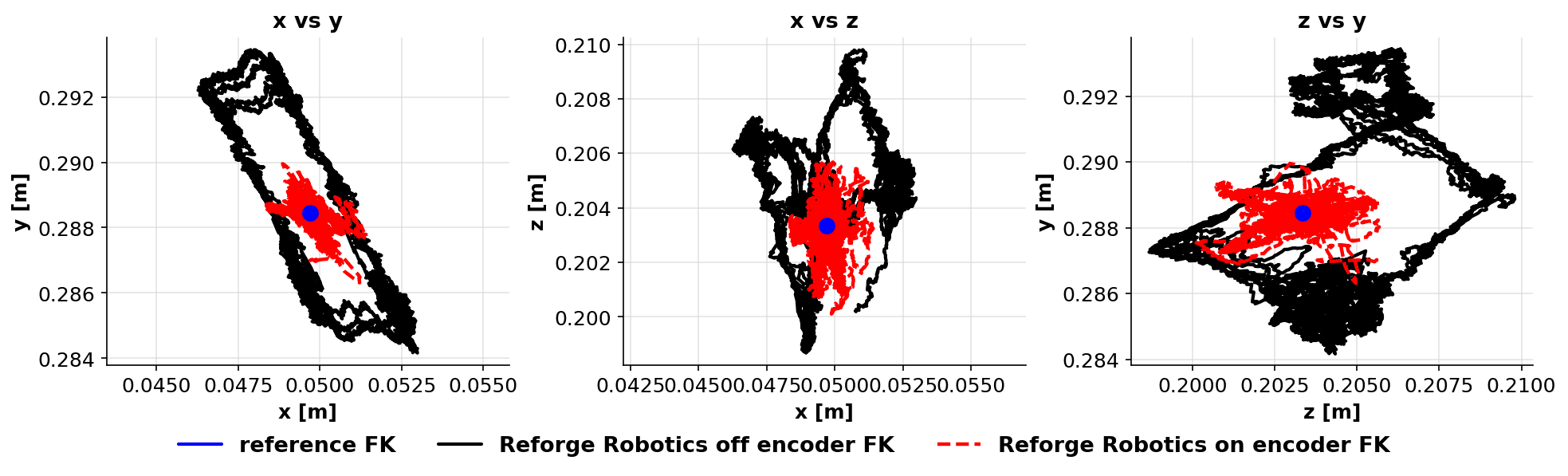
Estimated TCP position with Reforge software off and Joint Tracker plus Backlash Compensation on

Estimated TCP position in the validation test. Black is software off, red is Joint Tracker plus Backlash Compensation on, and blue marks the fixed reference. These measurements evaluate the combined software effect, not backlash compensation alone.

The per-joint results show that the compensation is effective across all joints, not just the ones with the largest backlash:

Joint

Without compensation

With compensation

Improvement

J0

0.330°

0.076°

4.37×

J1

0.948°

0.117°

8.11×

J2

0.927°

0.108°

8.59×

J3

0.320°

0.071°

4.52×

J4

0.319°

0.051°

6.26×

J5

0.204°

0.088°

2.32×

A 4.70× reduction in TCP tracking error during direction reversals changes what robotic milling can achieve. For a cell that was producing ±2 mm contour error, that drops to under ±0.5 mm — moving from rough machining territory into semi-finishing range without changing the robot, the spindle, or the CAM program.

What this means for your milling operation

Backlash compensation doesn’t turn a robot arm into a 5-axis CNC. The robot still has structural compliance, thermal drift, and dynamic limitations that a purpose-built machine tool doesn’t. But it removes one of the largest discrete error sources in robotic machining — and it does it through software, without mechanical modification.

For operations running KUKA, Fanuc, ABB, or other industrial platforms for milling, this means:

  • Tighter achievable tolerances on contoured surfaces and pocketed features — without slowing down
  • Reduced manual finishing after the robot pass — fewer witness marks, more consistent surface quality
  • Expanded part envelope — parts that previously required a CNC due to tolerance requirements may become viable on the robot cell
  • No hardware changes — deploys through the robot’s existing command interface as a software layer

The economics are straightforward. If backlash is costing you a finishing pass, a manual correction step, or a reject rate on contoured parts, software compensation addresses the root cause at a fraction of the cost of upgrading the robot.

FAQ

Can software really fix a mechanical problem like backlash?
Software doesn’t eliminate the physical gear clearance. It compensates for it by anticipating direction reversals and injecting corrective motion before the joint crosses the deadband. The gear teeth still have clearance — but the joint is already positioned to the correct side of the gap when the new motion begins.

Does backlash compensation work at high feed rates?
Yes. The compensation operates at the servo loop level, so it applies regardless of feed rate. In fact, higher speeds tend to benefit more because the dynamic effects of crossing the backlash gap — including the momentary loss of contact and the impact on re-engagement — are more pronounced at speed.

Which industrial robots have the worst backlash?
Backlash is present in every gear-driven robot. Robots with cycloidal or harmonic drive reducers (common in cobots and smaller industrial arms) tend to have less backlash than those with planetary gearboxes. However, even low-backlash drives accumulate wear over time. The actual backlash of a specific robot depends on its age, usage history, and maintenance. That’s why per-robot calibration matters more than platform-level specifications.

How does this compare to buying a higher-precision robot?
A precision-grade industrial arm (e.g., KUKA KR Fortec Precision or Fanuc M-20iD/25 series) reduces backlash through tighter mechanical tolerances. The trade-off is cost — typically 2-4× the base model — and the backlash still increases with wear. Software compensation can be deployed on any arm and recalibrated as conditions change, at a fraction of the hardware upgrade cost.

Reforge Robotics builds control software that makes industrial robots more accurate. Backlash compensation is part of the Covalent Joint Tracker product. Book a demo to see it on your platform.

10 Minutes to 3-5x Better Accuracy: How Kinematic Calibration Works

By Iago Alves Pereira

What happens during a KineCal calibration — and why it takes minutes instead of days.

Kinematic calibration has historically been a specialist operation. A laser tracker, a trained metrology engineer, hours of setup, and a production line taken offline. The result is sub-millimeter accuracy that lasts until the robot drifts — and then you do it again.

We built KineCal to deliver comparable results in roughly 10 minutes, using the robot's own sensors and a calibration fixture that costs under $35. This post walks through what happens during those 10 minutes, how the system identification works, and what the measured results look like.

The problem KineCal solves

Every robot arm ships with a kinematic model — the mathematical description of its geometry that the controller uses to convert between joint angles and Cartesian positions. Link lengths, joint axis orientations, offsets, frame alignments.

The model is based on nominal design parameters. The physical machine is not nominal. Manufacturing tolerances, assembly variation, installation effects, and wear all create discrepancies between the model and the real geometry. The controller doesn't know the difference. It plans motions using an idealized machine, and the real machine deviates.

The result is positional error — typically 0.6 to 1.0mm on a standard 6-axis arm out of the box. That's the gap between where the controller thinks the TCP is and where it actually is.

KineCal identifies the real kinematic parameters from measured data and replaces the nominal model with one that matches the specific robot as installed.

What happens in 10 minutes

The calibration process has three steps. The first two run sequentially on the robot. The third runs in the cloud.

Step 1: Fixture setup (~2 minutes). The operator places a calibration fixture in the robot's workspace. The fixture is built from commodity hardware — an off-the-shelf bracket and reference features that can be assembled in under five minutes the first time, and under two minutes after that. No precision alignment is required. The system identifies the fixture's location from the measurement data, so approximate placement is sufficient.

The fixture provides known geometric constraints that the calibration algorithm uses to separate the robot's kinematic parameters from the fixture's position. In practice, this means the operator doesn't need to know the fixture's exact location — only that it's rigidly placed within reach.

Step 2: Automated measurement routine (~5 minutes). The operator runs a single command through the Reforge SDK. The robot executes a structured sequence of movements, approaching the calibration fixture from multiple configurations. At each configuration, the robot's joint encoders record the joint angles while the TCP contacts or approaches the fixture's reference features.

The measurement routine is designed to maximize observability of the kinematic parameters. It exercises the robot through configurations that expose each parameter's effect on TCP position — varying joint angles, approach directions, and arm configurations to decorrelate the parameters during identification.

The routine is fully automated. The operator starts it and waits. No manual teaching, no jogging, no point-by-point recording.

Step 3: Model identification (~3 minutes, cloud). The measurement data is uploaded to the Reforge API. The server runs a system identification algorithm that fits a kinematic model to the observed data.

The algorithm solves for the actual DH parameters — link lengths, joint offsets, twist angles, and link offsets — that best explain the measured joint configurations given the geometric constraints of the fixture. This is an optimization problem: find the kinematic parameters that minimize the residual error between the model's predicted TCP positions and the observed measurements.

The output is a calibrated kinematic model specific to that robot. It downloads and deploys as a software update through the SDK.

What the results look like

We've validated KineCal internally across multiple robot platforms. The consistent result is a 3x to 5x improvement in positional accuracy.

Before calibration: Typical TCP positional error of 0.6 to 1.0mm. This is the error from the nominal kinematic model — the gap between designed geometry and actual geometry.

After calibration: TCP positional error of 0.18 to 0.21mm. This is close to the repeatability limit of the robots we've tested — meaning the calibrated model has eliminated effectively all of the systematic kinematic error, and the remaining error is dominated by the robot's own mechanical precision.

The improvement ratio depends on how far the specific robot's geometry has drifted from nominal. A brand-new robot with tight manufacturing tolerances might start at 0.5mm and reach 0.18mm — roughly a 3x improvement. A robot with accumulated wear, a replaced joint, or a significant installation offset might start at 1.5mm and reach 0.20mm — closer to 7x.

The calibrated accuracy is consistent across the workspace. Unlike touch-up programming, which corrects individual waypoints, kinematic calibration corrects the underlying model. Every position the robot moves to benefits from the correction, not just the positions that were explicitly taught.

How calibration times compare across products

KineCal is one of three calibration products in the Reforge platform. The calibration time varies by product because each captures different properties of the robot:

  • Kinematic Calibration (KineCal): Static geometry — link lengths, joint offsets, frame alignments. Calibration time: ~10 minutes.
  • Joint Tracker: Per-joint dynamic response — lag, resonance, damping. Calibration time: ~5-10 minutes.
  • Vibration Compensation (Shaper): Full structural frequency response — how the robot amplifies and dampens motion across its frequency spectrum. Calibration time: up to 48 hours of data collection.

The vibration compensation number deserves context. The 48 hours of data collection can be spread across overnight runs over the course of a week. The robot collects calibration data during periods when it would otherwise be idle. It doesn't require dedicated downtime — the calibration runs alongside or in between production shifts.

The kinematic calibration and Joint Tracker calibrations are the fast ones. Both are designed to run during a scheduled maintenance window or as part of initial commissioning. Combined, they take under 20 minutes and deliver both the geometric correction (KineCal) and the dynamic feedforward compensation (Joint Tracker).

No laser tracker required

Traditional kinematic calibration depends on external metrology — typically a laser tracker system costing $50,000 to $150,000, plus a trained operator. The laser tracker provides ground-truth TCP measurements that the calibration algorithm uses to identify the kinematic parameters.

KineCal replaces the external measurement system with a structured fixture and the robot's own sensors. The geometric constraints of the fixture provide the equivalent of ground-truth reference — not by measuring the TCP's absolute position in space, but by providing known geometric relationships that the optimization algorithm uses to solve for the kinematic parameters.

The trade-off is straightforward. A laser tracker gives you absolute accuracy referenced to a calibrated metrology instrument. KineCal gives you accuracy referenced to the geometric constraints of a commodity fixture. For applications that require traceable metrology — aerospace machining, medical device manufacturing — the laser tracker is the right tool.

For everything else — and that's the majority of robotic applications — KineCal delivers comparable results at a fraction of the cost, time, and expertise. A $35 fixture, 10 minutes of robot time, and no metrology specialist.

When to calibrate

The question of when to calibrate comes up in every evaluation. The practical answer: calibrate at commissioning, and recalibrate on a schedule matched to your accuracy requirements.

For most applications, every six months is a reasonable starting cadence. Robots in heavy use, high-precision applications, or environments with significant thermal cycling benefit from more frequent calibration — monthly or even after every tool change.

The key enabler is that 10-minute calibration time. When calibration is fast enough to fit into a maintenance window, it stops being a special event and becomes a routine step. The economics of calibration change fundamentally when the process takes minutes instead of days.

Reforge Robotics builds open-source motion control software that makes robot calibration fast, affordable, and repeatable.
Do You Need to Calibrate Every Robot?

By Iago Alves Pereira

When a model trained on one machine can cover the fleet — and when it can't.

One of the first questions we hear from teams evaluating Reforge is about scaling: if I calibrate one robot, do I need to calibrate every other robot of the same model?

The short answer is no — with a caveat that matters. A model trained on one unit of a given SKU will transfer to other units of the same SKU and deliver roughly 90% of the calibrated performance. The remaining 10% is the gap between nominally identical and physically identical. Whether that gap matters depends on your application.

This post explains what transfers across robots, what doesn't, and how to decide the right calibration strategy for your fleet.

What the model actually captures

When we calibrate a robot, we're building a mathematical model of how that specific machine behaves. For kinematic calibration, the model captures the real geometry — actual link lengths, joint axis orientations, offsets, and frame alignments as measured on the physical hardware. For dynamic calibration (vibration compensation and feedforward control), the model captures frequency response characteristics — how the robot amplifies or dampens motion at different frequencies, with what lag, and with what coupling between joints.

These properties come from two sources: the design of the robot and the specific physical instance.

Design-level properties are shared across all units of a SKU. The nominal link lengths, the gear ratios, the actuator types, the structural topology — these are determined by the engineering drawings and are consistent across the production run. A model captures these faithfully, and they transfer perfectly.

Instance-level properties vary from unit to unit. Manufacturing tolerances in link dimensions, joint axis alignment, gearbox backlash, bearing preload, cable routing, and assembly torques. These are small variations — typically tenths of a millimeter in geometry and single-digit percentage differences in dynamic parameters — but they compound through the kinematic chain and produce measurably different behavior at the TCP.

The 90% transfer

When you apply a model trained on Robot A to Robot B of the same SKU, you get the design-level correction for free. The systematic errors that all units of that model share — the difference between the nominal kinematic parameters and the actual average for that production run — are captured and corrected.

That correction alone is significant. On the platforms we've validated, the design-level error accounts for the majority of the total kinematic error. Correcting it brings most units from roughly 0.6-1.0mm of positional error down to the 0.2-0.3mm range.

The remaining instance-level error — the per-unit variation from manufacturing tolerances — is what the transferred model doesn't capture. It's real, but it's small relative to the uncalibrated baseline. This is what we mean by 90% of the performance: the transferred model eliminates most of the error, but the last increment of accuracy requires per-unit calibration.

When 90% is enough

For many applications, a transferred model is the right answer.

If your tolerance budget is 1mm and the uncalibrated robot has 2-3mm of error, a transferred model that brings every unit down to 0.2-0.3mm gives you substantial margin. You don't need per-unit calibration. You need one calibration per SKU, and every robot benefits.

This is the scaling story that matters for fleet operators. Calibrate one unit. Deploy the model across all units of that SKU. The marginal cost of adding the next robot is zero calibration time.

Applications where this works well:

  • Pick-and-place with tolerances above 0.5mm. The transferred model puts every unit well inside the budget.

  • Palletizing and machine tending. These applications are tolerance-friendly and benefit primarily from the speed improvement that vibration compensation provides. The dynamic model transfers well across units because the structural design is shared.

  • Visual inspection at fixed stations. If the robot moves to inspection positions and stops, the accuracy requirement is at the waypoints only. A transferred kinematic model is usually sufficient.

When you need per-unit calibration

The 10% gap matters when your application consumes the full accuracy budget.

If your tolerance is 0.3mm and the transferred model delivers 0.2-0.3mm, you're operating at the margin. Some units will pass. Others won't. The variation between units becomes the limiting factor.

Per-unit calibration closes the gap. Calibrating the specific robot identifies its actual geometry — not the average geometry of its SKU — and produces a model that reaches the platform's accuracy floor. On our validated platforms, that floor is approximately 0.18-0.21mm.

Applications where per-unit calibration matters:

  • Precision assembly and insertion tasks. Connector insertion, pin alignment, and similar operations where the tolerance is smaller than the per-unit variation.

  • Offline programming without touch-up. If the goal is to generate paths in simulation and run them on the real robot without manual correction, per-unit accuracy is the requirement. The transferred model gets close. Per-unit calibration eliminates the remaining teaching step.

  • Multi-robot coordination. When two or more robots need to agree on the location of a shared workspace, their individual kinematic errors need to be independently corrected. A shared model doesn't resolve the relative error between units.

  • Quality-critical applications where out-of-tolerance means scrap — welding, dispensing, laser processing — and the cost of a single bad part exceeds the cost of calibrating the robot.

The practical approach

The calibration strategy that makes sense for most fleets is a two-tier approach.

Tier 1: One model per SKU. Calibrate one robot of each model in your fleet. Deploy that model across all units of the same SKU. This covers the design-level error and handles the majority of the accuracy improvement with minimal effort.

Tier 2: Per-unit calibration where needed. For robots in precision applications, or for units that show higher-than-expected error with the transferred model, run per-unit calibration. The process takes roughly 10 minutes for kinematic calibration. It can be integrated into commissioning workflows or run during scheduled maintenance.The process for other products is similar because our system fine-tunes the base model, combining the initial data with a smaller dataset.

The key advantage of this approach is that per-unit calibration is not expensive. With Reforge's KineCal, the calibration fixture costs under $35 in commodity hardware. The measurement routine is automated through the SDK. The model fitting runs in the cloud. An operator can calibrate a robot without metrology expertise or specialized equipment.

When calibration takes 10 minutes and costs effectively nothing in equipment, the question shifts from "can we afford to calibrate every robot?" to "is there a reason not to?"

Recalibration and drift

The transferability question also has a time dimension. A model trained today captures the robot's current state. Over months, mechanical wear changes the properties — gearbox backlash increases, bearings develop play, structural characteristics shift.

We recommend recalibrating at a minimum every six months. Robots in heavy-use or high-precision applications benefit from more frequent calibration — even as often as monthly. The calibration process is designed to run during scheduled downtime or overnight without taking the robot offline during production.

A continuous monitoring feature is on our roadmap that would use ongoing data collection to detect drift and trigger recalibration automatically. Until then, scheduled recalibration at a cadence matched to your application's tolerance budget is the practical approach.

The bottom line

You don't need to calibrate every robot from day one. A model trained on one unit covers the fleet at roughly 90% of the calibrated performance. For most applications, that's more than sufficient.

Where the last 10% matters — precision assembly, offline programming, multi-robot coordination — per-unit calibration/fine-tuning closes the gap in about 10 minutes with no specialized equipment.

The practical strategy: calibrate one per SKU as the baseline, then per-unit where the application demands it. Scale the fleet first. Calibrate precisely where it counts.

—

Reforge Robotics builds advanced motion control software that makes robot calibration fast, affordable, and repeatable.
What Kind of Improvement Can You Actually Expect from Robot Software?

By Iago Alves Pereira

It depends on the robot. Here's how to think about it.

The most common question we hear in customer conversations is some version of: "What kind of results should we expect?"

It's a fair question, and it doesn't have a single answer. After deploying our control software across multiple robot platforms from different manufacturers, we've learned that the honest answer is: it depends on the robot. But not in the way most people assume.

The bell curve

There's a bell curve to how much software-based calibration and control can improve a given robot.

On one end are robots with genuinely poor mechanical engineering — excessive backlash, inconsistent manufacturing, structural problems that no amount of software will compensate for. If the hardware can't repeat a motion consistently, there's no model that can predict what it will do next. These robots see limited improvement because the problem isn't the controller or the calibration. It's the machine.

On the other end are over-engineered robots — machines built with such tight tolerances and rigid structures that they already perform close to their theoretical limits. A precision industrial arm from a top-tier manufacturer running well within its speed and load envelope doesn't leave much room for software to improve. The delta between the commanded trajectory and actual behavior is already small.

The large middle is where the results happen. This is most of the robots we see in the field. Machines with decent mechanical engineering that are underperforming because their controllers don't account for the actual dynamics of the physical system. Robots that vibrate, overshoot, or drift because the software was tuned for a generic case, not the specific machine as installed.

For that middle range — which includes most cobots, most affordable industrial arms, and most robots operating near their speed or load limits — the improvements are substantial.

Three tiers of improvement

We've built three products that each address a different layer of robot performance. The improvement you see depends on which layer is your bottleneck.

Vibration compensation

This is where we started, and it remains the most dramatic result. Vibration compensation uses a calibrated dynamic model of the robot to predict and pre-compensate for structural vibration before it happens. Instead of commanding a trajectory and waiting for the robot to stop shaking, the controller shapes the input so the robot arrives at the target position cleanly.

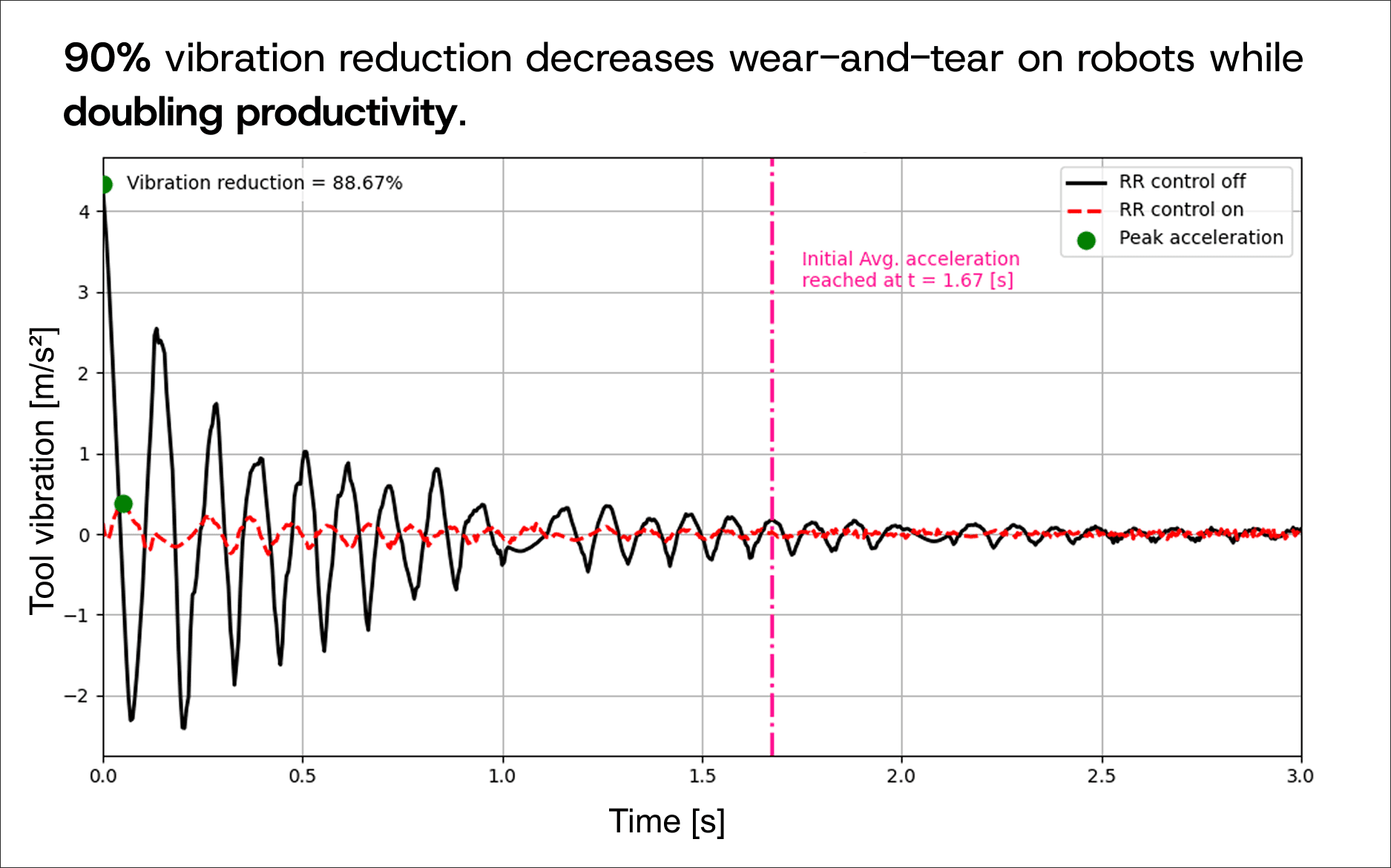
Across our deployments, we've consistently demonstrated over 90% reduction in residual vibration. In applications where the robot must stop and wait for vibration to settle before executing the next operation — visual inspection, precision pick-and-place, dispensing — this translates directly to throughput. We've measured 2x productivity improvement in these scenarios, because you're eliminating the settling time that was consuming half of every cycle.

The catch: vibration compensation requires the most calibration data. Currently up to 48 hours of data collection, which can be spread across overnight runs over the course of a week. We're actively working to reduce this. But it's important to be transparent — this isn't a 10-minute setup.

Kinematic calibration

Every robot ships with a kinematic model — a mathematical description of the arm's geometry. And on virtually every robot we've measured, that model doesn't match the actual machine. Manufacturing tolerances, installation effects, wear, and thermal drift all contribute to a gap between where the controller thinks the robot is and where it actually is.

Kinematic calibration identifies the robot's real geometric parameters by measuring its actual positions across its workspace. The result is a corrected model that accounts for the specific machine as installed.

The improvement: 3 to 5x increase in positional accuracy. On robots where we've measured 0.6 to 1.0mm of positional error, calibration brings that down to 0.18 to 0.21mm. And the calibration itself takes approximately 10 minutes. No laser tracker. No metrology specialist. A commodity calibration fixture that costs under $35 and assembles in under five minutes.

This is the product where we hear the most immediate "I need that" from customers, because the problem is so widespread and the current alternative — a $50,000 to $150,000 laser tracker — is prohibitively expensive for most teams.

Feed-forward controller

The feed-forward controller sits between the trajectory planner and the robot's actuators. It uses a calibrated dynamic model of each joint to predict how the robot will actually respond to a given command, then pre-compensates the trajectory so the end-effector follows the intended path more closely.

The improvement: up to 10x reduction in tracking error. On one platform, we measured TCP tracking error drop from over 10mm to under 2mm. On another, from 7.6mm to 1.9mm. The more important result is that tracking accuracy stays approximately constant as speed increases — the controller compensates for the dynamics that cause error to grow with speed on stock controllers.

For teleoperation, this changes what the system can physically do. At 5mm of tracking error, you're limited to coarse tasks. At 2mm, precision assembly, connector insertion, and close-tolerance operations become feasible.

What determines where you fall on the curve

The question isn't just "how much improvement" but "which improvement matters for your application."

If your robots are running visual inspection and losing throughput to settling time, vibration compensation is your highest-leverage product. If you're running offline-programmed paths and spending days on touch-up programming because the robot doesn't go where the model says, kinematic calibration solves that. If you're building a teleoperation system and the tracking fidelity limits what tasks the operator can perform, the feed-forward controller is what you need.

Some customers need all three. Some need one. The bell curve applies to each product independently — a robot that sees 90% vibration reduction might only see 3x accuracy improvement from kinematic calibration, or vice versa, depending on where the performance gap lives.

The one thing we can say with confidence: for robots in the middle of that bell curve — which is most of them — the improvements are not incremental. They're step-changes. And they come through software, with no hardware modifications.

How to find out where your robot sits

We've designed the calibration and evaluation process so you can find out quickly. Kinematic calibration takes about 10 minutes. The feed-forward controller calibration takes 5 to 10 minutes. Vibration compensation takes longer but can run in the background during normal operations.

If you're curious whether your robot is in the middle of the bell curve — where the improvements are real and measurable — the fastest way to find out is to run the calibration and look at the data.

Reforge Robotics builds open-source motion control software that helps robots move faster, track more accurately, and behave more predictably.

Why Sim2Real Falls Short for Robot Control

By Nosa Edoimioya

The simulation-to-real gap in robot control — and what to do about it.

We spent years assuming that if we built good enough simulations, we could transfer controllers directly to real machines. The physics and control theory exist. The simulators are getting better every year. The promise of sim2real is compelling: build once in simulation, deploy everywhere in reality.

We've now deployed control software across five robot platforms from different manufacturers. Different kinematics, different actuators, different controllers, different dynamics. And every deployment has taught us the same lesson: simulation gets you to about 70% of production performance. The last 30% lives in the real machine.

What simulation gets right

We use simulation constantly. Architecture validation, trajectory planning, workspace analysis, collision checking. If you're building a robot system and you're not simulating first, you're wasting time.

Simulation is excellent at geometry. Joint limits, collision volumes, workspace boundaries — these are properties of the mechanical design, and simulators capture them faithfully. Motion planning works. Offline programming works. Idealized dynamics for trajectory planning — gravity loading, inertial forces, basic torque budgets — are reasonable because the errors are small relative to planning margins.

Simulation catches gross errors cheaply. Sign flips in coordinate frames, trajectory violations, kinematic singularities. These are expensive to find on real hardware, and simulation eliminates them before you touch a real machine. That's genuinely valuable.

Where it breaks down

The gap between simulation and reality is not in geometry. It's in dynamics.

Simulation tells you where the robot should be. Production performance depends on where the robot actually is. Those are different things, and the difference is everything.

Unmodeled dynamics. Real robots have joint flexibility, cable routing forces, friction that varies with speed and direction, backlash in gearing, and structural compliance that changes with configuration. Simulation models the arm as a chain of rigid bodies connected by ideal joints. The real system is none of those things.

Parameter uncertainty. The datasheet says the link mass is 15 kg. The actual link, with cables and connectors, is 15.3 kg. The center of mass is shifted. The gear ratio has manufacturing tolerance. The friction coefficient changes with wear, temperature, and lubrication. Every parameter is slightly wrong, and together they produce trajectories that diverge measurably from simulation.

Environmental coupling. In simulation, the robot is bolted to an infinitely rigid floor. In reality, it's mounted to a structure with its own resonant frequencies, deflections, and compliance. The base moves. The floor vibrates. The mounting plate flexes. The robot and its environment are a coupled system, and simulation models only half of it.

The pattern across five platforms

These aren't theoretical concerns. They're what we've encountered on every deployment.

On one platform, our modeling assumed symmetric rotations about the base joint — a standard simplification that works for most robot arms. On the real machine, the kinematics broke that assumption entirely. We had to rearchitect the calibration and control pipeline. No simulation would have revealed this. The discrepancy only became visible when we measured the real system's responses.

On another platform, our controller was compensating for dynamics that didn't actually exist in the real robot. The tracking error metrics appeared to improve, but the actual path deviation got worse. The controller was fighting physics that wasn't there. The problem wasn't the algorithm. It was the model.

The pattern is always the same. Simulation captures the geometry. It misses the dynamics. And the dynamics are what determine production performance — whether the robot vibrates, whether it tracks accurately, whether it can run at speed without ringing.

What surprised us most is the per-unit variation. Two robots of the same model, from the same manufacturer, installed side by side, have different friction profiles, different structural stiffness, different backlash. They are nominally identical and dynamically distinct. A controller transferred from simulation works differently on each one.

Why domain randomization isn't the answer

The standard sim2real response is domain randomization. Train across a distribution of simulated parameters so the controller is robust to whatever the real robot turns out to be. Vary the masses, vary the friction, vary the damping, and hope the real system falls inside the distribution.

This produces controllers that are robust to uncertainty. It does not produce controllers that are optimal for the actual machine.

There's a fundamental difference between "works despite not knowing the dynamics" and "works because it knows the dynamics." A controller trained to handle a wide range of possible friction values will behave conservatively on every robot. A controller calibrated to the actual friction of a specific machine will use that knowledge to move faster and more precisely.

Robustness and performance are in tension. Domain randomization chooses robustness. For production systems where cycle time, accuracy, and vibration matter, that leaves performance on the table.

Calibrate, don't transfer

Our approach inverts the sim2real framing. Instead of starting with a simulation and trying to make the controller survive the transfer, we start with the real machine and measure its actual dynamics.

We calibrate a model to the specific robot as installed — its real mass properties, its real friction, its real structural behavior. During calibration, sensor data captures the machine's physical responses while controlled excitations expose its resonant frequencies and structural compliance. From that data, we build a dynamic model of how that specific robot actually moves, bends, and vibrates.

The controller is then optimized for the actual machine, not a hypothetical distribution of possible machines.

The results validate the approach. Across multiple platforms, we've demonstrated greater than 5x accuracy improvement and greater than 85% vibration reduction with a 2x increase in productivity. All through software, with no hardware modifications.

Better calibration builds better simulation

There's an irony here. The path to better simulation runs through the real world, not away from it.

When you calibrate a model against real machine data, you force that model to become a faithful representation of the actual robot. The identified parameters — the real masses, the real friction, the real structural modes — are exactly what a high-fidelity simulator would need.

Accurate control forces the model to match reality. That model can then be reused for simulation that actually predicts real behavior. The sim2real gap doesn't close by making simulation better in isolation. It closes by making simulation match reality — and that requires measuring reality first.

Distribution is not just a go-to-market problem. Every robot we calibrate is another real-world model that makes simulation more faithful. Scale calibration, and you scale the quality of simulation itself.

The bottom line

Simulation is indispensable. We would not build without it. But if you're building production robot control — where cycle time, accuracy, and vibration performance matter — simulation alone won't get you there.

The robot you simulated is not the robot you deployed. Measure the one you have.

Reforge Robotics builds open-source motion control software that helps robots move faster, track more accurately, and behave more predictably. Learn more at by booking a demo.

The Hidden Cost of Uncalibrated Robots

By Iago Alves Pereira

What poor accuracy actually costs — and why most teams don't see it.

Every industrial robot ships with a spec sheet that lists repeatability — typically ±0.05mm or better. That number is real. It means the robot can return to the same joint configuration with extraordinary consistency.

But repeatability is not accuracy. Repeatability tells you the robot can do the same thing twice. Accuracy tells you it's doing the right thing in the first place. The gap between those two concepts is where factories and warehouses quietly lose money — in ways that rarely show up on a single line item.

What "accuracy" actually means for a robot

A robot's controller plans motions using a kinematic model — a mathematical description of the arm's geometry. Link lengths, joint axis orientations, offsets, and frame alignments. If that model exactly matches the physical machine, the robot goes where it's told. If it doesn't, every commanded position has a built-in error.

The problem is that the model almost never matches the machine.

  • Manufacturing tolerances. No two robot arms are geometrically identical. The actual link lengths, joint axes, and offsets differ from the nominal model by tenths of a millimeter. The controller doesn't know this. It plans motions using an idealized machine that doesn't exist.

  • Installation effects. The base plate isn't perfectly level. The mounting structure has compliance. The tool center point and fixturing differ from what offline programming assumed. Before the robot runs its first cycle, it's already working from a map that doesn't match the territory.

  • Thermal drift. A robot that's accurate at 7 AM may be measurably different by 2 PM after hours of continuous operation. A robot OEM we spoke with confirmed that damping characteristics change over time and with temperature, justifying repeated recalibration. It's not a one-time problem.

  • Wear and damage. Gearbox backlash increases. Bearings develop play. Cable routing forces change. After a collision — which happens — kinematic error increases significantly and the robot needs recalibration. The geometry drifts from installation day forward.

The result is that the commanded position and the actual position are never quite the same. And most teams have no instrumentation to quantify the gap.

What this looks like in practice

We visited a bio-manufacturing company running dozens of robots across their facility. They observed 2–3mm of positional error when commanding the same Cartesian position from different joint configurations. Their existing calibration — adjusting joint reference offsets only — closed just 0.2–0.4mm of that gap. Their assessment: global kinematic accuracy is currently unsolved.

That same company sells robotic lab cells to third parties, meaning their customers also need to calibrate robots in the field. The cost compounds across their fleet and their customers' fleets.

The part that stuck with us: they told us their customers will likely not have a method to quantify the kinematic error accurately. They can't see the cost because they can't measure it.

This is the pattern we see in almost every conversation with startup robotics teams. The error is real, the cost is distributed, and the teams bearing it don't have the tools to put a number on it.

Where the money goes

The costs of uncalibrated robots don't appear on a single line item. They're distributed across the operation in ways that feel normal until you add them up.

  • Scrap and rework. Welding runs off-seam. Dispensing lands in the wrong location. Inspection measures the wrong point. The root cause is positional error, but it gets attributed to programming mistakes or process variation.

  • Touch-up programming. After offline programming generates a path, an engineer jogs the robot through each waypoint to correct for real-world positional error. Hundreds of waypoints means days per program. Every new part, every program change, every robot replacement triggers another round. One software manager at a robotics company told us their engineers "perpetually spend 5% of engineering time fine-tuning control speeds for different applications." That's not engineering. That's compensating for a geometric problem with labor.

  • Speed constraints. An uncalibrated robot may hold tolerance at 50% speed but drift out of spec at 80%. The easy fix is to run slower. The compounding cost is lost throughput across every shift, every day — and most teams never quantify what they're leaving on the table.

  • Settling time. Robots need 50–200ms per move for vibration to settle before the process can execute. Across thousands of cycles per shift, that settling time becomes hours of lost output.

  • Cell-to-cell variation. Programs aren't interchangeable between nominally identical cells because each robot has its own error signature. Scaling from 1 line to 10 doesn't mean copying a program 10 times. It means commissioning 10 times.

  • Deployment time. This is where the cost really hides. An integrator we work with estimates that 30–40% of deployment time goes to accuracy-related commissioning — not programming the task, but teaching the robot where things actually are versus where the model says they should be. For a deployment that takes weeks, that's days of engineering time burned on a problem that could be solved upstream.

If you're managing a robotics operation, some of these will look familiar. The question is whether you've added them up.

Why teams live with it

Traditional calibration requires a laser tracker — $50,000 to $150,000 in equipment — plus trained metrology engineers and hours or days of production downtime.

For high-value applications — aerospace machining, medical device assembly, precision metrology — the math works. Sub-millimeter accuracy is a hard requirement, and the parts are valuable enough to justify the investment. These industries calibrate routinely.

For everyone else — welding lines, palletizing, machine tending, general assembly — the error is manageable. Teams compensate with touch-up programming, slower speeds, and wider tolerances. It's not that they don't know uncalibrated robots cost them money. It's that the cure has historically been more expensive than the disease.

The result is an industry-wide pattern: most industrial robots run uncalibrated, with kinematic models that don't match the machines they describe.

The economics are changing

Two things are shifting the equation.

Accuracy requirements are tightening. As robots move into applications that were previously manual — precision assembly, lab automation, adaptive welding, high-mix manufacturing — the tolerance budgets that worked for single-SKU palletizing don't survive contact with flexible workcells running dozens of part variants.

The cost of calibration is dropping. New approaches use the robot's own sensors and structured measurement routines instead of external metrology equipment. A calibration fixture can be built from commodity hardware for under $35 and assembled in under five minutes. The calibration process takes minutes, not hours. No laser tracker. No metrology specialist. No production shutdown.

We've validated internally that this approach brings positional accuracy from roughly 0.6–1.0mm down to 0.18–0.21mm — a 3x to 5x improvement. That's the difference between a robot that needs touch-up programming and one that runs from offline-generated paths. Between a cell that takes a week to commission and one that takes a day.

When calibration becomes cheap enough to repeat after every tool change, every collision, every maintenance window, the economics invert.

How to evaluate whether calibration makes sense for your operation

Not every robot cell needs sub-millimeter accuracy. If you're running a single-SKU palletizing line with wide tolerances, the existing model may be good enough.

Calibration makes sense when:

  • Your team is spending days on touch-up programming after every new part or program change. That labor cost is the calibration problem in disguise.

  • You're running robots below rated speed to hold tolerance. The throughput you're leaving on the table compounds across every shift.

  • Programs aren't portable between cells. If scaling from 1 line to 10 means commissioning each one from scratch, per-robot kinematic error is almost certainly the cause.

  • Deployment timelines are dominated by commissioning, not programming. If 30–40% of deployment time is accuracy-related, calibration solves the bottleneck.

  • You're moving into higher-precision applications — adaptive welding, lab automation, inspection, assembly — where the tolerance budget no longer absorbs the kinematic error.

  • Your fleet is growing. The cost of uncalibrated robots scales linearly with fleet size. Calibration cost, done right, doesn't have to.

The question is no longer "can we afford to calibrate?" It's whether you can afford not to.

Reforge Robotics builds open-source motion control software that makes robot calibration fast, affordable, and repeatable. Get in touch to learn more.
What 5x Accuracy Actually Means for Teleoperation

By Iago Alves Pereira

How we validated Joint Tracker's tracking improvement and what the data tells us about teleoperation performance.

We validated Joint Tracker on two 6-axis robot platforms. The goal was to measure how much model-based feedforward control actually reduces tracking error, and to understand what that reduction means for teleoperation — where tracking fidelity directly determines what tasks the system can perform.

This post walks through the validation methodology, the measured results, what drives the improvement, and why it matters for teams building teleoperation systems.

How we measured it

The validation methodology is straightforward.

We define a trajectory in task space and use inverse kinematics to convert it to joint space. The robot executes the trajectory while we capture encoder readings at each joint. We then apply forward kinematics to the encoder data to compute the actual TCP position throughout the motion.

We run this twice: once with Joint Tracker off (the robot's stock controller executing the trajectory directly) and once with Joint Tracker on. Both runs are compared against the desired trajectory.

The metric is RMS tracking error — computed per-joint in degrees and per-axis at the TCP in millimeters. Joint-level error tells you how well each actuator follows the reference. TCP error tells you what the end-effector actually does — which is what the operator experiences.

On the first platform, we swept speed from 1.0x to 2.5x nominal to see how tracking degrades with speed. On the second, we validated at 5.0x speed scale — well beyond the trajectory's original timing.

Results

Platform A (6-axis arm used in teleoperation applications):

  • TCP tracking error: 7.6mm → 1.9mm (4.1x improvement)

  • Joint tracking error: 1.12° → 0.24° (4.6x improvement, averaged across joints)

  • Per-joint improvements ranged from 1.9x to 9.2x

  • Per-axis TCP improvements: 6.0x (X), 6.1x (Y), 2.0x (Z)

  • Measured at top speed scale of 2.5x

The Z-axis improvement is notably lower than X and Y. This tells us the dynamics along Z are harder to compensate — likely because the Z-axis loads gravity more directly, and the structural compliance in that direction is different. The joint-level data is consistent with this: the joints most loaded by gravity showed smaller improvement ratios.

Platform B (6-axis arm):

  • TCP tracking error: 10.9mm → 1.9mm (5.7x improvement)

  • Joint tracking error: 1.51° → 0.18° (8.6x improvement, averaged across joints)

  • Per-joint improvements ranged from 4.7x to 15.7x

  • Per-axis TCP improvements: 8.6x (X), 4.9x (Y), 4.0x (Z)

  • Measured at 5.0x speed scale

The larger improvement on Platform B is partly because the baseline error was worse — 10.9mm versus 7.6mm at the TCP. The converged accuracy with Joint Tracker on is nearly identical on both platforms (1.9mm), which tells us the controller is bringing both robots to roughly the same performance floor regardless of how poor the stock tracking was.

This result is important. It suggests the residual 1.9mm error is dominated by effects the current model doesn't capture — backlash, higher-frequency structural modes, or sensor resolution — rather than by the controller itself.

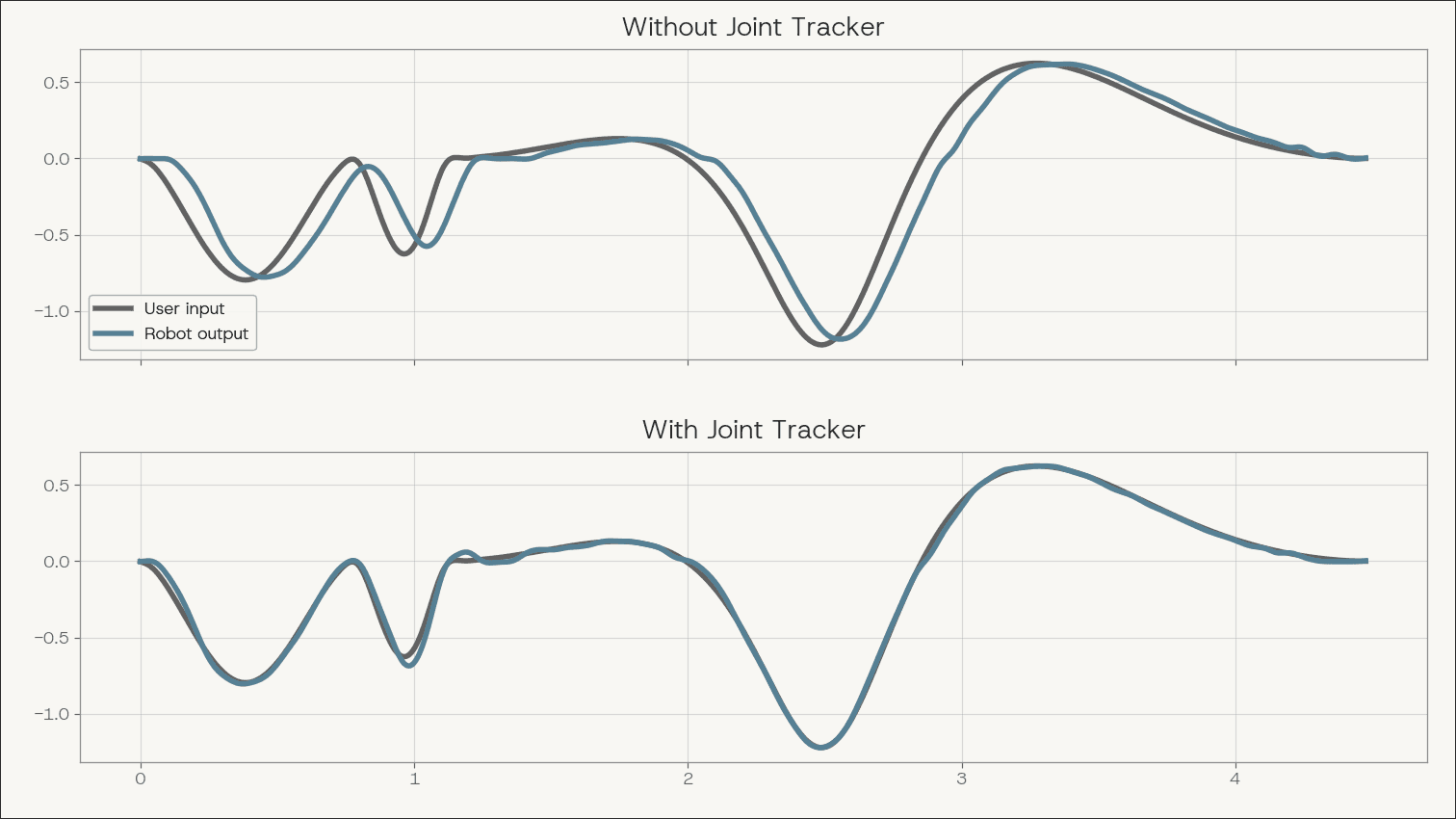
User input vs. robot output with and without Joint Tracker.

User input vs. robot output with and without Joint Tracker

The speed behavior

The most informative result isn't the headline multiplier. It's what happens as you increase speed.

With Joint Tracker off, tracking error grows approximately linearly with trajectory speed. This is expected. The stock controller uses feedback only. At higher speeds, the joints lag further behind the reference because the controller is always reacting to error rather than anticipating it. Faster motion means more dynamic error, and the feedback loop cannot keep up.

With Joint Tracker on, tracking error stays approximately constant across the speed sweep.

This is the defining characteristic of feedforward compensation. The calibrated model predicts what each joint will do at a given command, and the controller pre-compensates. The compensation scales with the trajectory, so the tracking fidelity holds as speed increases.

For teleoperation, this has a direct consequence. An operator using a system with stock control learns to slow down — they move, wait for the robot to settle, check the position visually, correct, and continue. The system's tracking error creates a feedback loop that caps the operator's throughput.

When tracking error is constant across speed, that loop disappears. The operator can move at their natural pace and trust the end-effector to follow.

What drives the tracking error

Tracking error in teleoperation comes from two sources that compound in a way that is difficult for operators to compensate for.

Kinematic error is the static component. The robot's internal kinematic model — the DH parameters, the joint offsets, the frame alignments — doesn't exactly match the real machine. Manufacturing tolerances, installation differences, and wear all contribute. The result is a systematic TCP offset that varies with joint configuration. This is not a fixed bias. It changes across the workspace, so the operator cannot learn a single correction.

Dynamic error is the speed-dependent component. At speed, each joint lags behind, overshoots, or oscillates relative to the commanded trajectory. The end-effector follows a path that diverges from what was commanded, not just at the final position but throughout the entire motion.

Our products address both. Kinematic calibration (KineCal) corrects the geometric model using measured data from the specific robot. Model-based feedforward (Joint Tracker) uses per-joint dynamic models — calibrated to the actual physical response of each joint — to pre-compensate the trajectory before it reaches the actuator driver.

The key learning from our validation work is that controller performance is tied directly to model quality. When we tested early models that didn't accurately capture the joint dynamics, the controller compensated for behavior that didn't exist on the real robot. The tracking error metric appeared to improve, but the actual contour error — the spatial deviation from the intended path — got worse. The controller was generating oscillations to counteract dynamics that weren't there.

This reinforced something we now treat as a principle: model quality is the bottleneck, not algorithm quality. A good controller with a bad model will underperform a simple controller with an accurate model.

The calibration pipeline

Joint Tracker sits in the robot's motion command pipeline between trajectory generation and the actuator driver. The pipeline from the user's perspective has three steps.

Data collection. An automated calibration routine runs on the physical robot through the Reforge SDK. Controlled excitations exercise each joint through its dynamic range while sensors record the response.

Model identification. The calibration data is uploaded to a cloud API that runs system identification. The output is a set of per-joint dynamic models that capture how each joint actually responds to commands — its lag, its resonant behavior, its damping characteristics.

Deployment. The calibrated models deploy locally with the Joint Tracker controller. For teleoperation, Joint Tracker operates in a streaming mode — it processes trajectory commands in real time as they arrive from the operator interface.

The entire calibration process is designed to run without metrology equipment or specialized engineers. The data collection is automated. The model fitting runs in the cloud. The deployment is a software update.

What 5x means for the application

Reducing TCP tracking error from 8-10mm to roughly 2mm changes what a teleoperation system can physically do.

At 5mm or more of TCP error, the system is limited to tasks with coarse tolerances — moving boxes, gross positioning, pick-and-place where the gripper has generous clearance. The robot can't place things precisely enough for tasks like connector insertion, precision assembly, or any operation where the tolerance is smaller than the tracking error.

At 2mm, tasks that were previously out of reach become feasible. This isn't about making existing tasks marginally better. It's about expanding the set of tasks the system can attempt at all.

The per-unit variation question matters here too. Two robots of the same model, from the same manufacturer, will have different dynamic characteristics — different friction profiles, different structural stiffness, different backlash. A controller tuned on one unit doesn't produce the same tracking performance on another. Per-robot calibration handles this. For manufacturers with tight tolerances, models may hold across units of the same SKU. Where they don't, calibration can be integrated into the manufacturing workflow as a standard step.

What the data tells us

The validation results across two platforms demonstrate a few things clearly.

First, model-based feedforward control delivers a measurable and consistent improvement in tracking accuracy — 4x to 8x at the joint level, 4x to 6x at the TCP. The improvement is not marginal.

Second, the speed-invariant behavior is the more important result. Flat tracking error across speed means the system's accuracy doesn't degrade as operators move faster. For teleoperation, this directly translates to higher operator throughput without sacrificing fidelity.

Third, the converged accuracy of approximately 1.9mm TCP RMS on both platforms suggests a performance floor determined by effects outside the current model's scope. Understanding and reducing that floor is the next engineering problem.

The 5x number is real and validated. But the behavior underneath it — constant accuracy across speed, per-robot calibration, model quality as the bottleneck — is what actually matters for building teleoperation systems that work at production scale.

Reforge Robotics builds open-source motion control software that helps robots move faster and track more accurately. Book a demo for access to all our data or to learn more.

Why Your Robot Vibrates

By Nosa Edoimioya

—And why it's costing you more than you think.

In 2024, we set out to solve a problem that most robotics teams had learned to live with: residual vibration.

Not because it was unsolvable — the physics and control theory have existed for decades. But because solving it required bridging a gap that the robotics industry had quietly accepted. On one side, affordable robot hardware that's proliferating across every sector. On the other, motion performance that still depends on manual tuning, conservative speed limits, and a lot of patience.

Residual vibration sits right in that gap. And it's more expensive than most teams realize.

The problem hiding in plain sight

Every robotics engineer has seen it. The arm reaches the target position, and instead of stopping cleanly, it shakes. Sometimes for a few milliseconds. Sometimes long enough to watch.

What's actually happening is straightforward physics. A robot arm is not a perfectly rigid machine. It has structural compliance, actuator dynamics, cable routing, and real-world properties that the commanded trajectory doesn't account for. When the joints reach the target, the rest of the system hasn't fully settled. Energy is still stored in the structure. The end-effector oscillates around the intended position until that energy dissipates.

That oscillation is residual vibration. And it doesn't just show up at the end of moves — the robot is lagging, overshooting, and ringing at structural frequencies throughout the entire trajectory. The controller just doesn't know it.

The real cost

We've worked with teams across truck loading, precision manufacturing, and visual inspection. The pattern is always the same: vibration quietly constrains three things that directly affect the business.

The cost of vibration and Reforge Robotics' solution to it

Robot tool vibration comparison with Reforge Robotics controller off or on.

Throughput. Every move that ends with vibration needs settling time before the next operation can begin. In a single pick-and-place cycle, that might be 50 to 200 milliseconds. Across thousands of cycles per shift, that settling time becomes hours of lost output. For high-volume applications, we're talking about a measurable hit to unit economics.

Accuracy. If the application can't wait for the vibration to settle — because the next operation starts immediately, or the arm is in continuous motion — the robot is executing at a position offset from where the controller thinks it is. In welding, dispensing, inspection, or any path-sensitive task, this degrades quality.

Deployment time. This is the one that surprises teams the most. Vibration behavior changes with speed, payload, mounting, and even the specific robot unit. A trajectory that works cleanly on one machine may vibrate badly on another. One software manager at a robotics company told us their engineers would "perpetually spend 5% of engineering time fine-tuning control speeds for different applications." Multiply that across every deployment, and you have a serious engineering bottleneck.

Why robots vibrate

Residual vibration is not a defect. It's physics.

Every robot arm is a mechanical system with mass, stiffness, and damping at every link and joint. When the robot accelerates or decelerates, those physical properties determine how the structure responds. If the commanded motion includes acceleration changes that excite the system's natural frequencies, the structure will vibrate.

Think of it like a spring-mass-damper system — the fundamental model we use in mechanical engineering. The robot's links have mass and resist acceleration (inertia). The structure resists deformation like a spring (stiffness). And energy dissipates through joint friction and material behavior (damping). The equation of motion that governs this — mx'' + cx' + kx = F(t) — is well understood. The challenge is that every robot, in every installation, has different values for those parameters.

Three factors make this especially pronounced on modern cost-effective robots:

Lighter, more flexible structures. Affordable arms use lighter materials and less rigid construction. That lowers the natural frequencies of the system, which means even moderate speeds can excite vibration. Heavier industrial robots aren't immune — they just push the problem to higher speeds.

Lower-resolution actuators. Less expensive motors and gearboxes have more compliance, and less precise torque control. What the joint actually delivers is a noisier version of what was commanded.

Generic controller tuning. Most robot controllers ship with a single set of gains optimized for a general case. They don't account for the specific payload, mounting structure, or installation. Every deployment starts with a controller that is only approximately correct for the system it's controlling.

Why common fixes fall short

The instinctive response is to slow the robot down. Lower speeds mean lower accelerations, less energy into structural modes, less vibration. It works — but it trades throughput for smoothness. At some point, the business case for automation breaks down.

The next step is manual gain tuning. An engineer adjusts controller parameters — PID gains, acceleration limits, jerk limits — until the vibration is acceptable for a specific trajectory and payload. This works for a fixed scenario. Change the speed, change the payload, move the robot to a different mounting, and you're back to tuning.

The common thread: these approaches are either too conservative, too narrow, or too labor-intensive to scale.

Closing the gap with data from the real machine

The fundamental problem is that the controller doesn't know enough about the physical system it's controlling. It commands a trajectory based on an idealized model — or no model at all — and the real dynamics create the gap that shows up as vibration.

We solve this by calibrating the robot as installed — on its real structure, with its real payloads, using its real actuators — and changing the model with the system's configuration and payload. During calibration, sensors capture the machine's physical responses while controlled excitations expose its resonant frequencies and structural behavior. From that data, we build a precise and comprehensive dynamic model — a mathematical replica of how that specific robot actually moves, bends, and vibrates.

That model deploys directly into the control architecture. The software anticipates and neutralizes physical deviations before they happen. No manual gain tuning. No conservative speed limits. No months of trial and error.

Here's what that looks like in practice on a KUKA KR500:


The results speak for themselves: we've demonstrated larger than 85% reduction in vibration even with a 2x increase in productivity. The machine gets faster and smoother at the same time — through software alone, with zero hardware modifications.

The best part is we've built production infrastructure around it. You start with a base model that you fine-tune to your setup. Our databases store and maintain models for each robot in your fleet. And we provide enterprise-grade support as you scale.

Why this matters now

Cost-effective robots are proliferating across the general-purpose robotics market. They're cheaper, easier to deploy, and increasingly paired with AI systems that can plan, perceive, and adapt.

But intelligence doesn't eliminate motion error. A robot still has to follow the path. It still has to move quickly without shaking. It still has to repeat the same motion reliably. It still has to behave in production the way it behaved in testing.

The industry has largely solved the design and mass manufacturing of affordable robots. What it hasn't solved is making those robots perform like high-end machines. That's a software problem — and it's the one we're working on.

The robot vibrates because the controller doesn't know how the real machine moves. Fix that, and the robot stops shaking.

Reforge Robotics builds open-source motion control software that helps robots move faster, track more accurately, and behave more predictably.

Contact us to learn more about how we address residual vibration.

See what Reforge can improve on your robot

Bring one representative trajectory or error dataset. We’ll identify the relevant product, required inputs, and a bounded evaluation plan.

Book a Demo